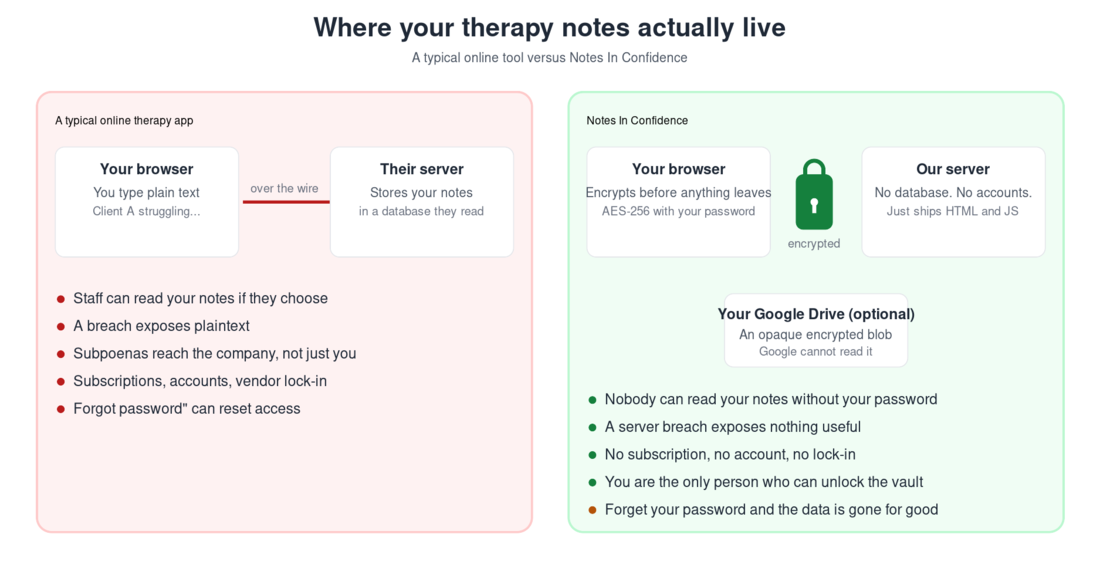
Many online tools that handle sensitive information send what you type to a server in plaintext, or encrypt it with a key the operating company holds — in either case, the operator's staff may be able to read what you wrote, depending on the design. End-to-end encrypted tools are different: only the people on the conversation hold the key. Notes In Confidence is built that second way. Your notes are encrypted inside your own browser, with a password only you know, before any of it leaves your device.
Google Drive is part of this design, not optional. On the hosted service at notes.notesinconfidence.uk, signing in with Google is required — there is no local-only mode. Two files end up in your Google Drive, both fully encrypted in your browser before upload: the live Sync file in a hidden app folder, and the periodic Backup files in a visible folder. Google holds those files, can see they exist, can see their size and modification time, but cannot read what is inside them, because the decryption key is your password and your password never leaves your browser.
This is what people in the security world call a zero-knowledge design. It is the same approach used by reputable password managers and end-to-end encrypted messengers. The trade-off is real: nobody can read your notes without your password, including you, if you forget it.
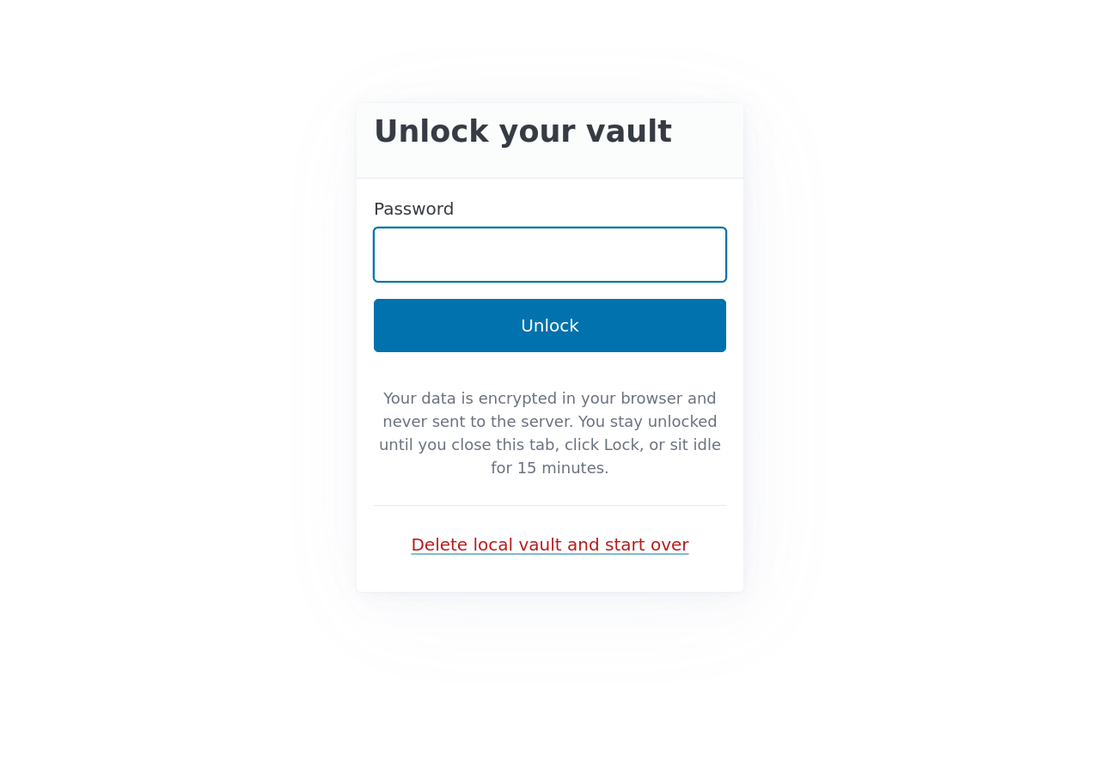
In practice this means the app behaves like the screen below: a small unlock prompt is the only thing between you and your notes, and the prompt is local. There is no email field, no account, no server-side check, no "forgot password" link.
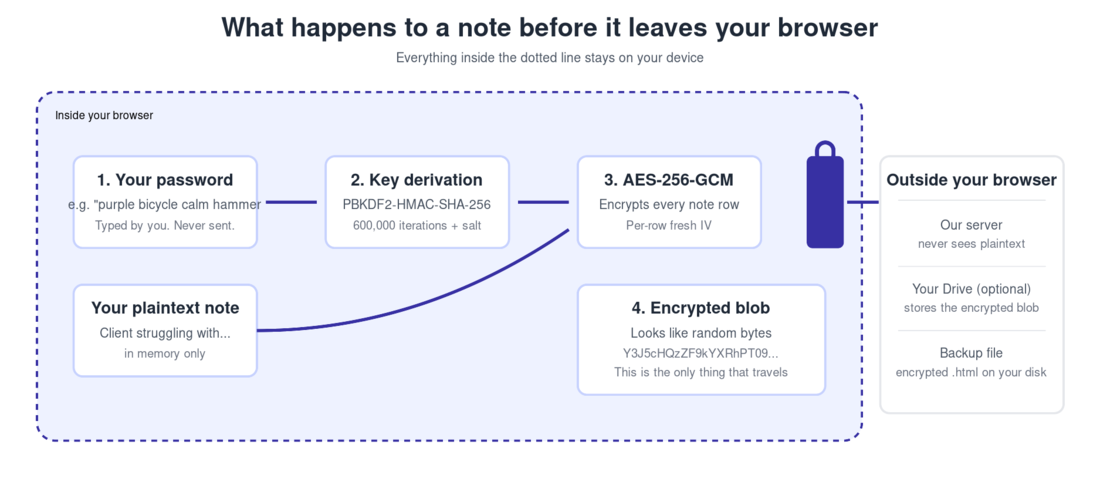
What "encrypted in your browser" actually means
When you create a vault, you choose a password. The app does not send that password anywhere. Instead, it puts the password through a one-way function called PBKDF2 (six hundred thousand rounds of HMAC-SHA-256, with a random salt) to produce an encryption key that lives only in your browser's memory while you are unlocked.
Every note, every client record, every supervisee record is then encrypted on its own with AES-256-GCM, the same algorithm that secures most banking traffic. Only after a row has been encrypted does anything travel: to your local IndexedDB on this device, to your hidden Google Drive app folder for Sync, to the visible Notes In Confidence Backups folder of your Google Drive for the periodic Backup files, or into a manual Local Backup file when you download one. In every case the bytes that travel are already encrypted; the password to decrypt them never leaves your browser.
What our server actually has
The server is deliberately minimal. It is a Django app whose only job is to ship HTML, CSS, and JavaScript to your browser. There is no database for user data. There are no user accounts. There are no sessions, no cookies that identify you, no logins that track who you are. The only piece of state the server keeps is a single integer counter that records how many vaults have been opened across all users since the launch date. This counter contains no information about you.
Because nothing identifying about you ever reaches our server, we cannot legally be classified as a data processor for your clinical content under GDPR. You remain the data controller for the information you choose to enter. The server is, technically and legally, a delivery channel for the app code, not a custodian of your records.
What Google does and does not see
Google does hold your data. On the hosted service, Drive is mandatory: you signed in to Google during setup and granted two narrow permissions, and ever since then the app has been writing files into your own Google Drive. There are two kinds of file, in two different places, both fully encrypted by your browser before upload.
The Drive Sync file lives in your Drive's hidden appDataFolder, a per-app folder that does not appear in your normal Drive view (not even to you, browsing your own Drive). It is the live encrypted vault. Every save you make in the app pushes an updated copy of this file about thirty seconds later. Google can see that the file exists, and how big it is, and when it was last modified. Google cannot read its contents.
The Drive Backup files live in a normal, visible folder of your Drive called Notes In Confidence Backups — you can browse to it any time. Each file is a self-decrypting HTML file, written on a regular cadence (default seven days). Each is also fully encrypted with your password. The decryption JavaScript is bundled inside each file, so that you can download one to any computer, open it in any browser, type your password and read your notes — even if this website disappears forever. Google again sees only the encrypted bytes: filename, size, modification time. Not the contents.
The OAuth scopes we request from Google are drive.appdata (for the hidden Sync file) and drive.file (for the Notes In Confidence Backups folder only). Both are scoped to files this app creates itself. We have no permission to read or write any other file in your Drive — your tax returns, your photos, your shared documents are all invisible to the app. If you revoke either permission in your Google Account settings, the app instantly loses the corresponding capability and your local vault enters read-only mode on the next unlock until you reconnect or restore from a Local Backup.
To put it bluntly: if Google's servers are breached, what an attacker would find in your Drive folders are two encrypted blobs they cannot decrypt without your password. The same is true if Google itself, under court order, were compelled to hand the files over. The encryption is the protection.
What this design does not protect against
A zero-knowledge design protects you against a very specific set of threats: server breaches, our own staff (we have none of your data to misuse), Google reading your therapy notes, anyone intercepting traffic on the wire, and any future change to our policies (we can never quietly start reading what we have never had).
It does not protect against everything. Below is the honest list.
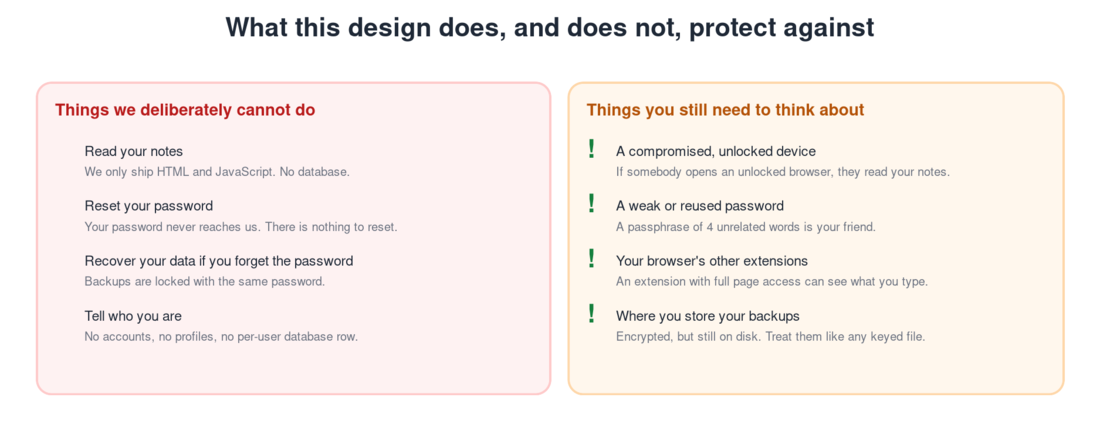
A compromised device while you are unlocked is the biggest gap. If somebody sits down at your unlocked browser, they can read your notes the same way you can. The app helps with this in two ways. It auto-locks after fifteen minutes of inactivity (with a warning at fourteen minutes), and the Lock button in the navigation flushes any pending sync and locks immediately when you step away.
A weak password matters. The encryption is only as strong as the password feeding it. We require twelve characters as an absolute minimum. We strongly recommend a passphrase of four unrelated words rather than a short complicated password, because length is what makes a password resistant to guessing. Something like "harbour candle willow argent" is far stronger than "P@ssw0rd!".
A forgotten password is unrecoverable. There is no reset link, not from us, not from Google, not from a backup file. A backup is locked with the same password as the vault it came from. This is the inescapable trade-off of true zero-knowledge: the price of nobody else holding your key is that nobody else can hand it back to you.
Other browser extensions are worth a thought. An extension with permission to read all pages can in principle see what you type. Use a browser profile dedicated to clinical work if this matters to you, and keep extensions in that profile to the minimum.
The read-only safety lock
There is one piece of the security model worth understanding because it can surprise you. If your device cannot reach Google Drive (you revoked the permission, the network is broken, your token expired and silent re-auth failed), the app does not let you keep editing. It enters read-only mode on the next unlock. You can still read every note, search the vault, look up clients, but the forms are disabled and a banner at the top explains why.
The reasoning is straightforward: if sync is broken, every change you make exists only in this browser's IndexedDB. One cleared browser cache, one private-browsing window, or one device replacement, and those changes are gone. The app pauses writes until sync is healthy again, so you do not accumulate work that will silently vanish. Reconnect from Advanced > Drive, or restore from a Local Backup, and the forms re-enable.
How to verify any of this for yourself
1. Watch the network. Open your browser's developer tools, go to the Network tab, and use the app for a while. Every cross-origin request you see should be either to googleapis.com (which carries your already-encrypted blob) or to accounts.google.com (the Google sign-in flow). Nothing carries plaintext clinical content back to our server, because our server has nothing to receive it with.
2. Inspect your local store. In the Application tab, find IndexedDB and open tn_vault. Every record's encrypted_data field is an opaque base64 string, not readable JSON. That is the same form your data takes when it is at rest on disk and when it is at rest in your Drive.
3. Look at the Drive Backup file. Open drive.google.com in another tab, browse to the Notes In Confidence Backups folder, and download any backup file. Open it in a plain text editor (Notepad, TextEdit, VS Code). The body of the file is page after page of opaque base64 — the encrypted vault payload — bracketed by /*TN-ENV-START*/ and /*TN-ENV-END*/ sentinels. That is exactly what Google's storage holds. Without your password, that is all anyone gets.
If you read code, the open security model is documented in the Terms of Service and the Privacy Notice you can access from any page in the app, and in the project's README.
A note on what this does for your professional duties
You remain the data controller for the client information you enter. That responsibility does not change with the choice of platform. What changes is the surface area: with this app, the only place plaintext clinical data exists at rest is on your own devices and inside an encrypted backup file you control. Whether that simplifies or complicates your record of processing activities is a question you and your supervising body are best placed to answer, but the technical position is now genuinely yours to define.
The Terms and Privacy Notice that you tick to accept during setup spell out the legal position in detail: free software provided "as is", no warranty or support contract, an enumerated list of risks you have been told about, and an explicit acknowledgement that you (not the operator) are the data controller for any clinical content you enter. They are worth reading.